
On this page
Most Spanish apps have a microphone button somewhere, so “has speaking practice” doesn’t tell you much. The question we ask about any Spanish app is narrower: in a normal session, how many times do you put a sentence together yourself and say it out loud? This roundup is organized around that question, and around what kind of feedback you get when you do.
We make Avita, so it’s first on the list. It’s the one built around exactly this problem, but we’ve tried to be as fair to the others as we’d want them to be to us, including the cases where they’re the better pick. Everything below was checked against each company’s own site or app listing in October 2026.
The short version
| App | How you speak | Feedback | Best for | Free option |
|---|---|---|---|---|
| Avita | Answer characters in a story out loud, in full sentences, about 49 times a lesson | Score, corrected version and a reason on every answer | People who need to speak soon, A1 to B2 | First 5 lessons of every level; 3 days full access with a free account |
| Speak | Repeat phrases, drill patterns, then role-play conversations | Real-time pronunciation and phrasing feedback | Phrase patterns and pronunciation | 7-day free trial |
| Pimsleur | 30-minute audio lessons where you answer prompts aloud | Voice Coach for pronunciation; Conversation Coach (beta) for Latin American Spanish | Hands-free practice on a commute | 7-day free trial, plus a free lesson |
| Babbel | Course lessons with speech recognition, plus Babbel Speak conversation scenarios | Speech recognition; guided scenarios | A structured grammar course with some speaking | First lesson of every course; Babbel Speak free for registered users for now |
| Busuu | Speaking exercises corrected by other learners, plus speak-only Conversations | Corrections from native speakers in the community; feedback after each Conversation | Feedback from real Spanish speakers | Free tier; a few Conversations lessons to try |
| italki / Preply | Live video lessons with a tutor | Whatever your tutor gives you | Real, unscripted conversation | Paid trial lessons |
| Language Transfer | Audio course; you pause and answer before the recorded student does | None, you check yourself against the recording | Understanding how Spanish is built, for free | Free |
| Dreaming Spanish | Mostly no speaking: it’s a listening library | None | Huge amounts of comprehensible listening | Free tier plus Premium |
Avita
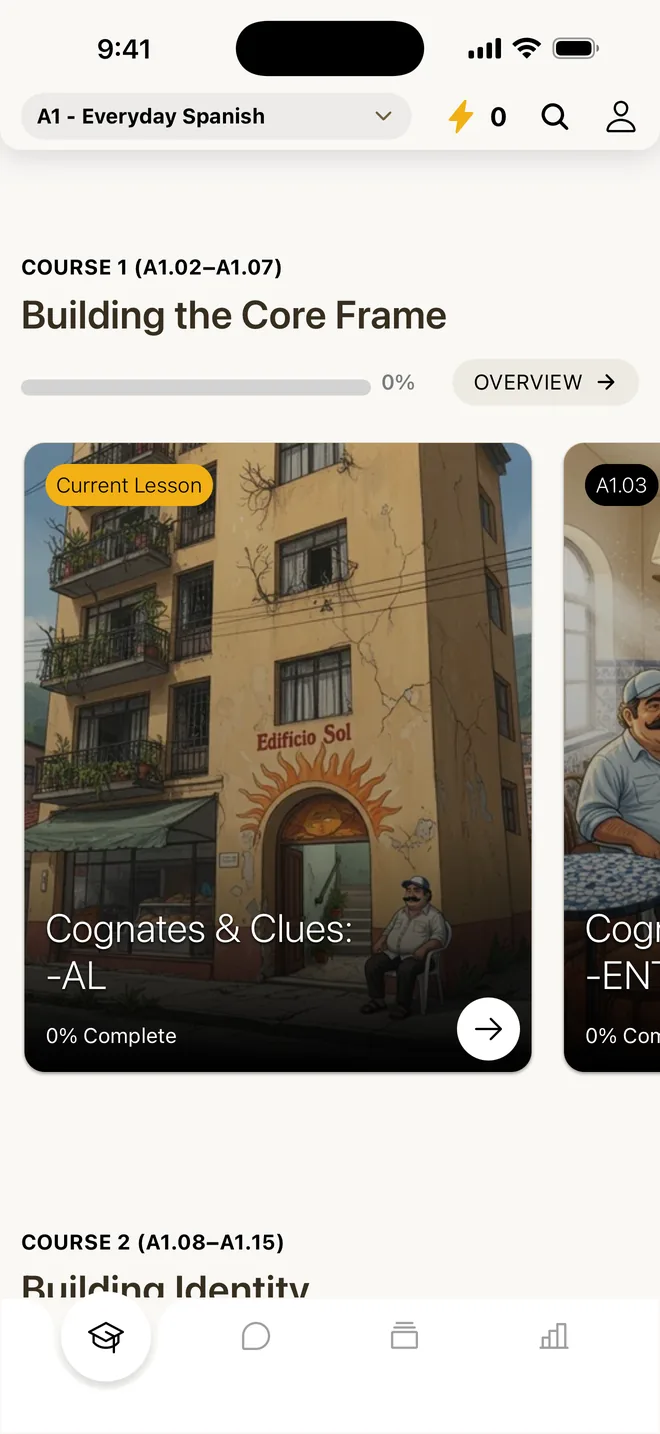
Avita is an app for iPhone and Android where every lesson is a spoken conversation inside a story. The Spanish course is set in Edificio Sol, an apartment building in Medellín, Colombia. You meet Doña Carmen at the bakery and neighbors like Mateo and Inés, and the story keeps going for 200+ lessons from A1 to B2. It teaches Latin American Spanish.
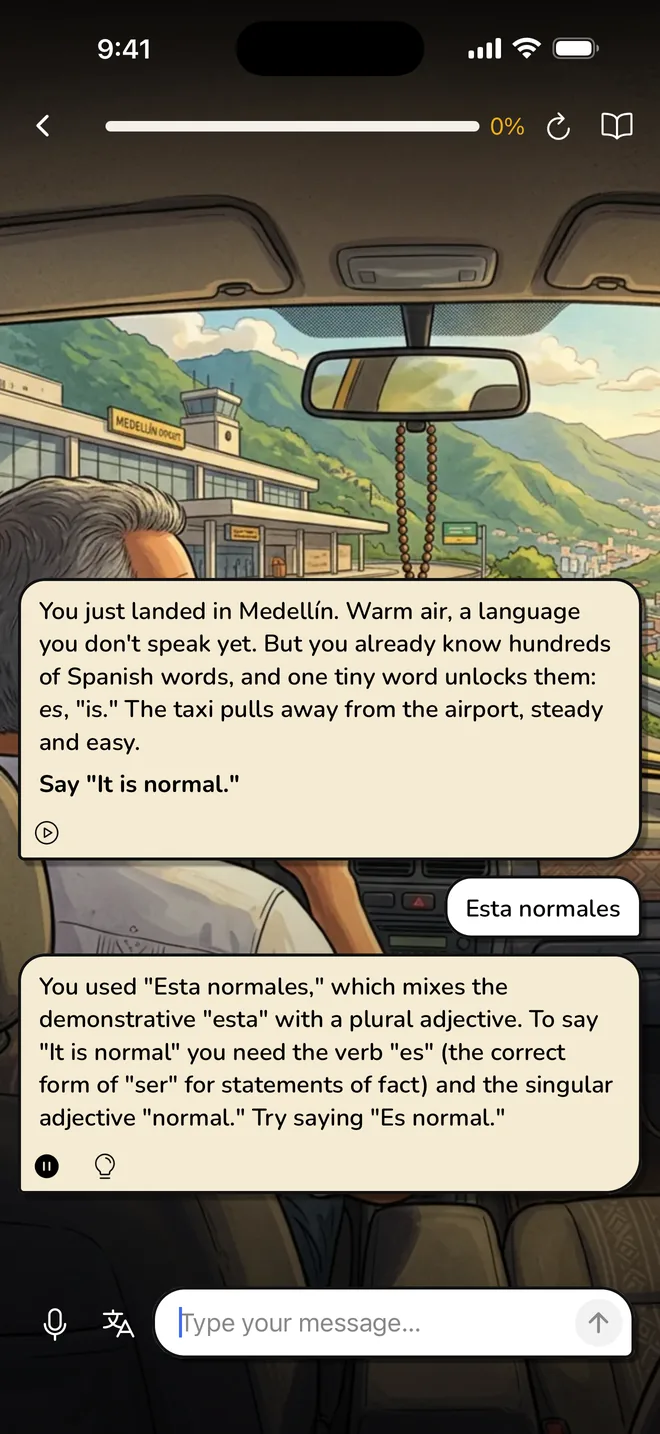
Each lesson starts with a short reading that teaches the grammar and words, and Listen reads it aloud with each word highlighted. Then a character talks to you and you answer out loud in full sentences. In one early lesson your shower handle comes off in your hand, and you carry it down to the lobby to ask Don Miguel ¿Hay una ferretería por aquí? (Is there a hardware store around here?). He waves at the entire city. Your neighbor Lina draws a map on her hand instead, and a few answers later you’re telling him El mercado está al lado del parque (The market is next to the park). There’s no multiple choice, no word bank and no tiles. A lesson asks you to say about 49 things out loud, and a full course comes to roughly 10,000 spoken answers. Every answer gets a score, a natural corrected version and a short reason why. You can ask for a hint or translation, or type when you can’t talk.
Best for: people with a reason to speak soon, like a move, a partner’s family or a trip, and people who’ve done years of another app and still freeze.
Limitation: Avita doesn’t score pronunciation and has no human teachers, so it won’t fix your accent or replace talking to a person. It’s phone-only (no web app), needs a connection, and the course stops at B2. Role-play scenarios and open chat are part of Avita Pro.
Speak
Speak is a speaking-focused app that teaches Spanish, French, Italian, Japanese, Korean and Mandarin to English speakers. It’s built on AI speech technology, and its lessons run through three phases it calls Learn, Practice and Apply.
You learn the phrase patterns locals use in a situation, repeat them until they feel automatic, then use them in a back-and-forth role-play conversation in the app. Speak gives real-time feedback on pronunciation and phrasing, and its Premium Plus plan adds a lesson creator where you pick the topic.
Best for: learners who like drilling useful sentence patterns until they come out without thinking, and who want feedback on how they sound.
Limitation: there’s no permanent free tier, only a 7-day trial. A lot of the early speaking is repeating sentences the app gives you rather than building your own. We compare the two in more detail in Avita vs Speak.
Pimsleur
Pimsleur is the classic audio course, now an app, with 30-minute lessons and courses in 50+ languages, including Latin American Spanish.
Its lessons follow what Pimsleur calls the principle of anticipation: the recording asks you for something, pauses for your answer, then plays the correct response. New words come back at gradually longer intervals. The app adds Voice Coach for pronunciation feedback and a role-play mode, and its newest release notes list a Conversation Coach in beta for All Access subscribers learning Latin American Spanish, French and Japanese.
Best for: commuters and anyone who wants to practice with their hands and eyes busy. Pimsleur supports CarPlay.
Limitation: in the core audio lessons, you compare yourself to the recording rather than getting feedback on what you said, so a mistake can slip by unnoticed. And the prompts set up each sentence for you, so you’re rarely deciding what to say. More in Avita vs Pimsleur.
Babbel
Babbel is a structured course app that teaches 13 languages, with separate Spanish (Spain) and Spanish (Mexico) options.
Lessons use speech recognition so you can say answers out loud, and dialogues model real exchanges. Babbel Speak, in the app’s Speak tab, adds guided conversation scenarios that walk you step by step toward speaking in full sentences, available in Spanish, French, German and Italian. Babbel labels it a beta and says it’s free for registered users for a limited time.
Best for: people who want a classic, well-organized grammar course and like clear explanations in English.
Limitation: most of a typical lesson is exercises rather than speaking, and the conversation feature is still a beta that Babbel says may change or become paid. See Avita vs Babbel.
Busuu
Busuu is a course app with 14 languages and a community of learners who correct each other.
You can record an answer to a speaking exercise (up to 30 seconds), and native or fluent speakers in the Busuu community correct it, by voice or in writing. Busuu also has Conversations, a speak-only feature with no written reply option, leveled from A1 to C1, with personalized feedback at the end. Its Spanish course is one of the courses that include it. Free learners can try a few Conversations lessons; full access needs a paid plan (Busuu’s own pages differ on whether that’s Premium or Premium Plus).
Best for: learners who want feedback from real Spanish speakers without booking a tutor.
Limitation: community corrections come from volunteers, not teachers, and you wait for them instead of getting them as you speak. Full Conversations access needs a paid plan. Our Avita vs Busuu page goes deeper.
italki and Preply
Both are marketplaces for independent tutors. italki lists over 2,300 Spanish tutors and Preply over 15,000, as of October 2026. On italki you pay per lesson; on Preply you subscribe to one tutor and pay every 28 days.
You talk to a person on video (on italki, anywhere from 30 to 90 minutes), the most realistic speaking practice on this list.
Best for: real conversation, accent work, and anything specific to your life that no app covers.
Limitation: cost and scheduling. As of October 2026, italki’s Spanish page puts tutors at $4 to $60 an hour, and Preply’s Spanish price filter runs from $3 to over $50 a lesson, so daily practice adds up fast. Quality varies by tutor. We wrote a full comparison in Avita vs a tutor.
Language Transfer
Language Transfer is a free audio course funded by donations, with no ads and no sign-up. Spanish is one of its complete courses (French and Italian are shorter introductions).
You listen to a teacher work through Spanish with a recorded student. When the teacher asks the student a question, you pause, work it out and say your answer out loud before the student does. The site’s own instruction is to “pause, think and answer out loud.”
Best for: understanding how Spanish sentences are built, cheaply, and getting used to producing them from the first track.
Limitation: it’s all audio with no feedback beyond comparing yourself to the student, and it’s up to you to actually pause and speak. It’s a foundation, not a full path to conversation.
Dreaming Spanish
Dreaming Spanish is a video library built on comprehensible input: Spanish you can mostly follow, graded by level, with progress tracked in hours watched. There’s also Dreaming French. The app has a free tier and paid Premium plans.
As for speaking, mostly it doesn’t ask you to, on purpose. Its FAQ recommends starting to speak at level 6 of its roadmap, or level 5 if you aren’t too worried about your pronunciation.
Best for: building listening, which matters a lot. If you can’t understand people, you can’t hold a conversation either.
Limitation: it isn’t speaking practice. Pair it with any of the apps above.
What about Duolingo?
Duolingo has speaking exercises from the first lesson: you repeat words, translate sentences aloud and join short dialogues. Its Video Call feature, a short conversation with the character Lily, is part of the Duolingo Max plan. Most Duolingo exercises are still tapping, matching and translating, which is why it isn’t higher on this list. We cover it properly in Avita vs Duolingo and Duolingo alternatives for speaking.
How to choose
Ask yourself what’s missing right now.
- You can’t get sentences out at all: pick something that makes you build them yourself, many times a day. That’s Avita, or Language Transfer if you want free and audio-only.
- Your sentences come out but sound off: Speak or Pimsleur, for pronunciation feedback, or a tutor.
- You can talk but only with an app: book a tutor on italki or Preply, or post recordings to the Busuu community.
- You can’t understand people when they talk back: add Dreaming Spanish.
Most people need two of these, not one. A common combination that works: a daily speaking app, a weekly tutor and listening on the side.
Our take: If you need to speak Spanish and you can only use one app, pick one where you build and say your own sentences every session, with feedback on each one. That’s what we built Avita to do: about 49 spoken answers a lesson, each corrected, inside a story set in Medellín. Speak and Pimsleur are strong choices if pronunciation is your main worry, and nothing beats a tutor for real conversation once you’re ready for it.
The first five lessons of every level are free, with no account needed, so you can check how much talking a lesson involves before you decide. If you’re starting from zero, our guide on how to speak Spanish from day one has a plan for your first weeks.
Questions people ask
What is the best app to practice speaking Spanish?
It depends on what you're missing. If you can't get sentences out, pick an app where you build and say your own, with feedback on each: that's what Avita is built for, at about 49 spoken answers per lesson. If your accent is the issue, Speak or Pimsleur. If you need real conversation, a tutor on italki or Preply. Many people combine two.
Is there a free app to practice speaking Spanish?
Language Transfer's Complete Spanish course is free and donation-funded; you pause and answer out loud. Avita's first five lessons of every level are free, and a free account gets three days of full access with no card. Busuu has a free tier, and Babbel says its Babbel Speak conversations are free for registered users for a limited time.
Can you learn to speak Spanish with just an app?
An app can take you a long way: you can build thousands of sentences out loud and get each one corrected. A full Avita course is roughly 10,000 spoken answers. But apps can't fully copy a real person who talks fast, changes the subject and doesn't wait for you. Use an app for daily volume and start talking to people as soon as you can.
Is Duolingo good for practicing speaking Spanish?
Duolingo includes speaking from the first lesson: you repeat words, translate sentences aloud and join short dialogues, and Duolingo Max adds Video Call with the character Lily. Most of a typical session is still tapping, matching and translating, though. It's a good daily habit; if speaking is the goal, add an app or tutor that makes you build full sentences out loud.
Should I practice speaking or listening first?
Both, but you don't have to wait to speak. Dreaming Spanish, an input-first library, recommends starting to speak at level 6 of its roadmap. Others, including us, start speaking in lesson one, following the idea from linguist Merrill Swain (1985) that trying to say things shows you what you can't yet say. Whichever you choose, add plenty of listening you can follow.